
Exploring Trending Solana Tokens
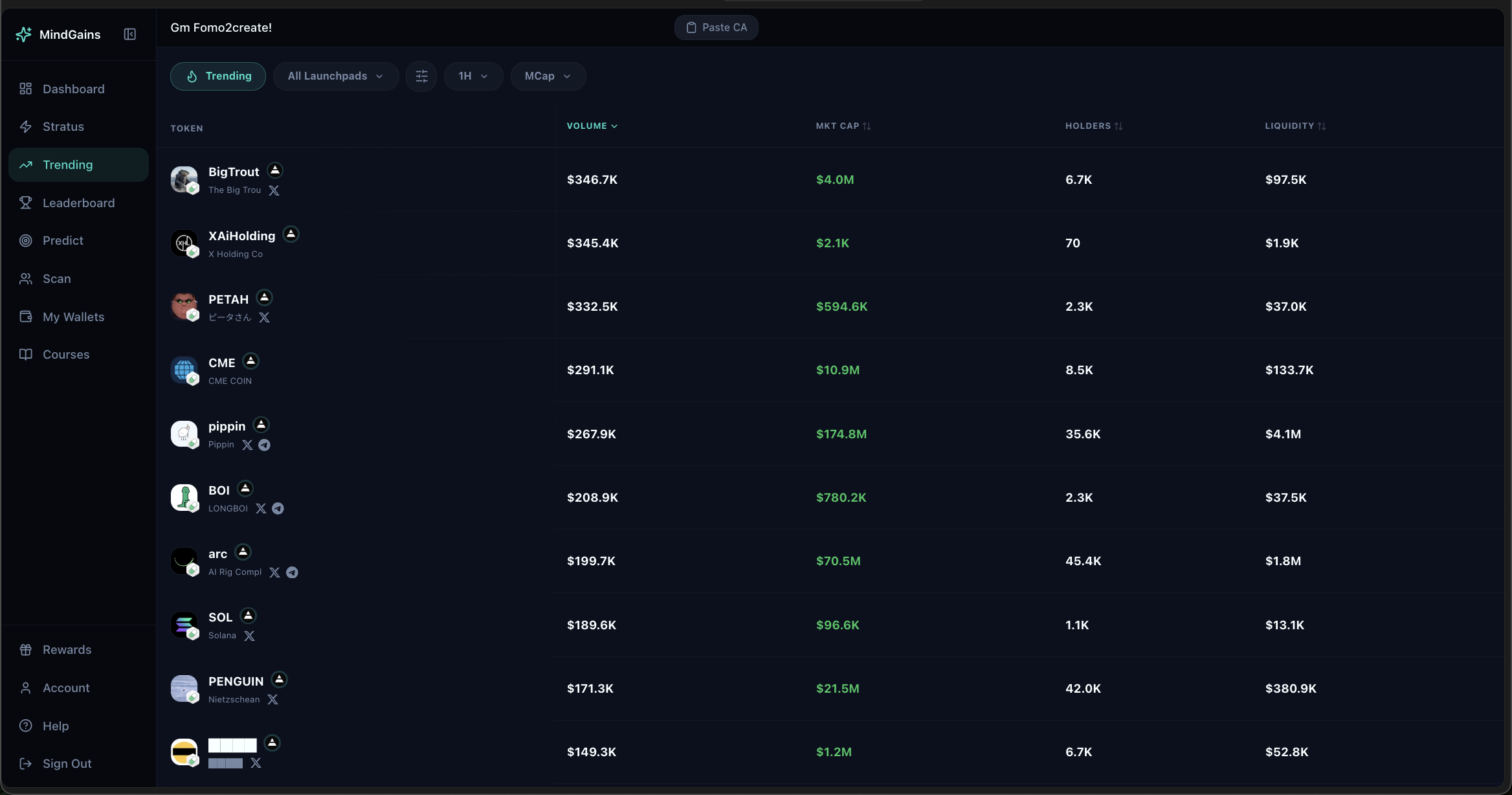
The Trending page tracks top-performing Solana tokens by volume, market cap momentum, and holder growth. Find early opportunities before they hit mainstream attention.
How Trending Works
Navigate to Trending from your sidebar or add the Trending Tokens widget to your dashboard. The page displays a real-time table of tokens sorted by volume and activity.
Each token entry shows:
Token name and icon: Token identifier with symbol
Volume: 24-hour trading volume
Market cap: Current market capitalization
Holders: Total holder count
Liquidity: Available liquidity pool depth
24h change: Price movement percentage (green = up, red = down)
Look for tokens with high volume relative to market cap—these often signal strong momentum and trading interest.
Filters and Timeframes
Use the filter bar to customize what you see:
Timeframe: 1H, 6H, 24H, 7D to view trending tokens over different periods
Launchpad filter: "All Launchpads" or select specific platforms (Pump.fun, Raydium, etc.)
Sort by any column to prioritize volume, market cap, holders, or liquidity.
Actions
Click any token row to open detailed analysis including:
Full price chart
Holder distribution and trends
Top wallets holding the token
Safety metrics
You can also paste the token's contract address directly into Trader Scan to find wallets trading it.
Using Trending with Other Tools
Trending pairs well with other Mind Gains features:
Import to Trader Scan: Use "Import trending" in Trader Scan to add top tokens automatically and find overlap wallets
Compare with Stratus: Cross-reference trending tokens with Stratus Signals to see if smart money is buying
Check holder safety: Paste trending CAs to view holder analysis before entering
High volume doesn't always mean safe. Always check holder distribution and safety metrics before trading trending tokens.
Access
All users can view Trending tokens. Pro members get advanced sorting, export capabilities, and the ability to save promising tokens to watchlists.